 Fleet Files
The DOT compliance and truck inspection app for small fleetsYour fleet’s paperwork.
Ready when you need it.
Fleet Files keeps driver qualification files, truck records, pre-trip inspections and short-haul hours in one place, and tells you what is coming due. Built for owner-operators and small fleets.

For iPhone and iPad. Subscription required. No demo or sales call needed.
- Every item names its FMCSA rule
- Browser access for your drivers
- Inspections save with no signal
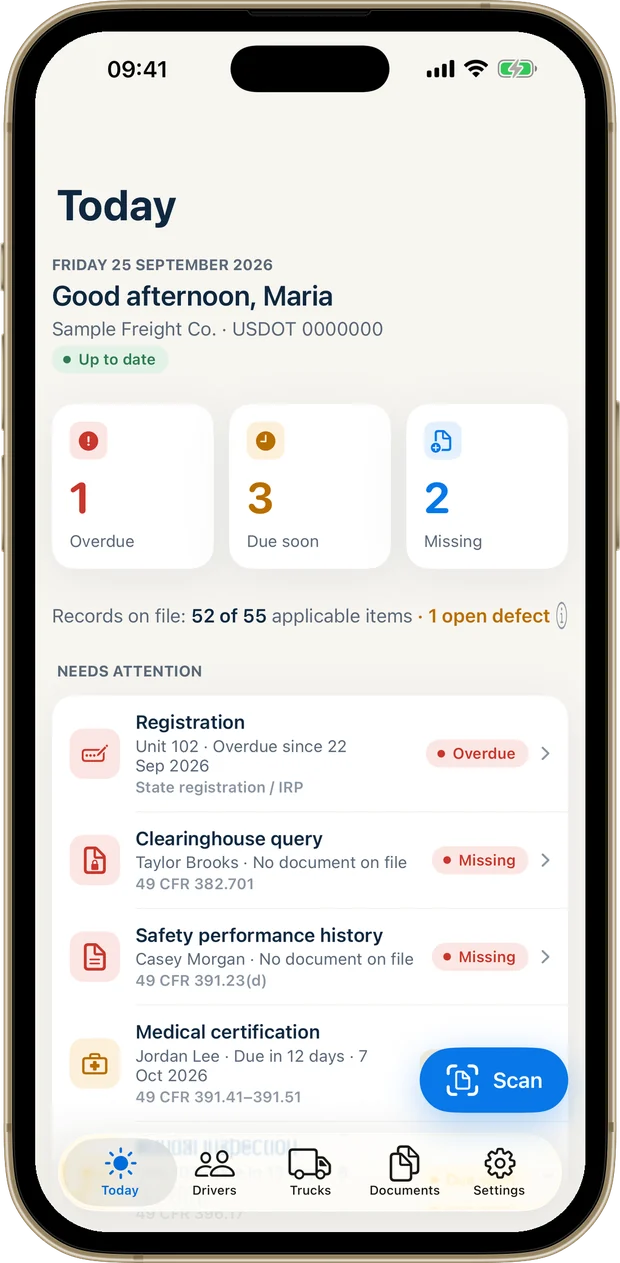
Find records faster.
Driver files, inspections and maintenance records in one place.
Stay ahead of deadlines.
See missing records and get expiration reminders.
Keep your team involved.
Drivers and staff can submit records through their browser, including on Android.
Never miss a DOT deadline.
One home screen shows what’s overdue, what’s due soon and which records are missing.
- Every item names the FMCSA rule it comes from
- Reminders before licenses, medical cards, registrations and inspections expire, as far ahead as you choose
- See how many records are on file against what applies to your fleet
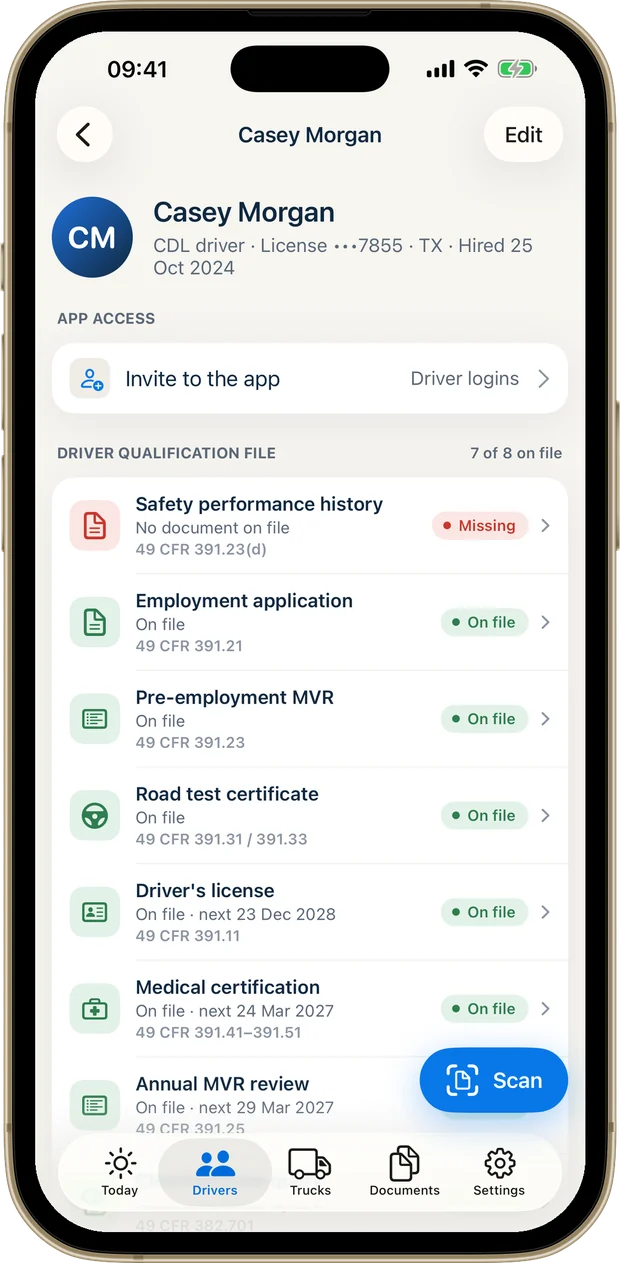
Spot file gaps before an auditor does.
A driver qualification (DQ) file for every driver: license, medical card, MVRs, road test and the other qualification documents, kept together.
- Scan paper documents with your camera; dates are read from the page for you to confirm
- Drug and alcohol records, including Clearinghouse queries, are visible only to the owner and admins
- Hazmat drivers: track each driver’s hazmat endorsement expiration
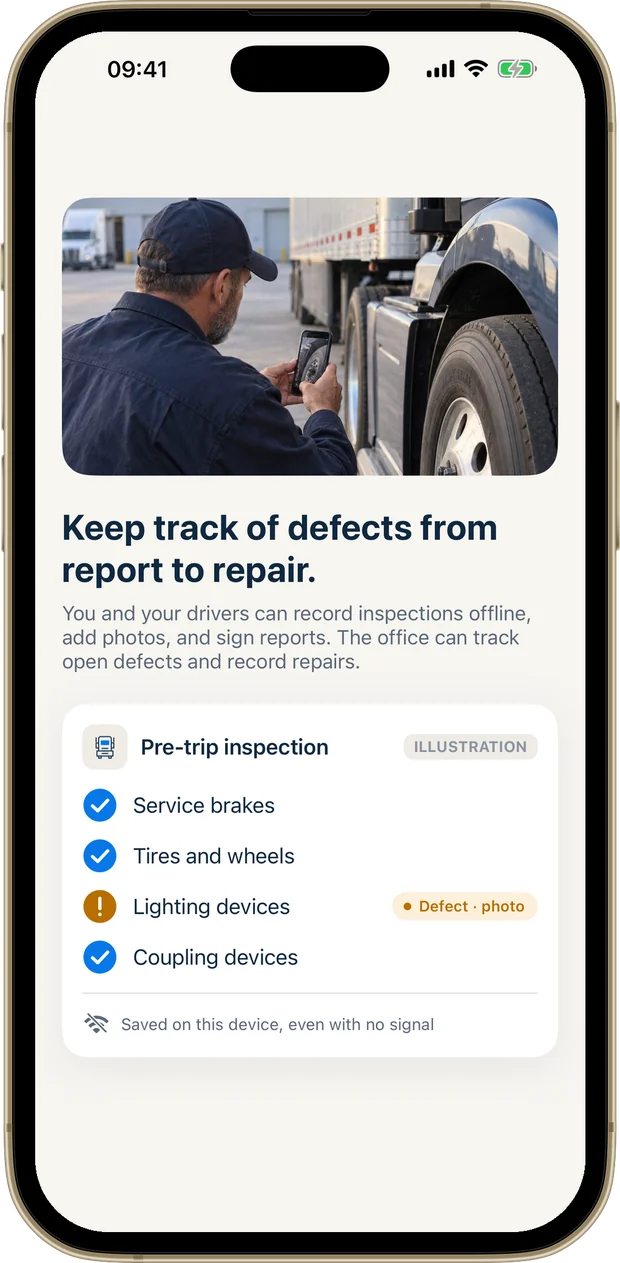
Keep your trucks rolling.
A truck inspection app your drivers will use: pre-trip and post-trip inspections (electronic DVIRs) with a checklist, defect photos, notes and a signature.
- Before a pre-trip, drivers see the truck’s last inspection and any open defects
- Mark defects repaired, with who fixed them and when
- Track annual inspections, registration and scheduled maintenance for every truck
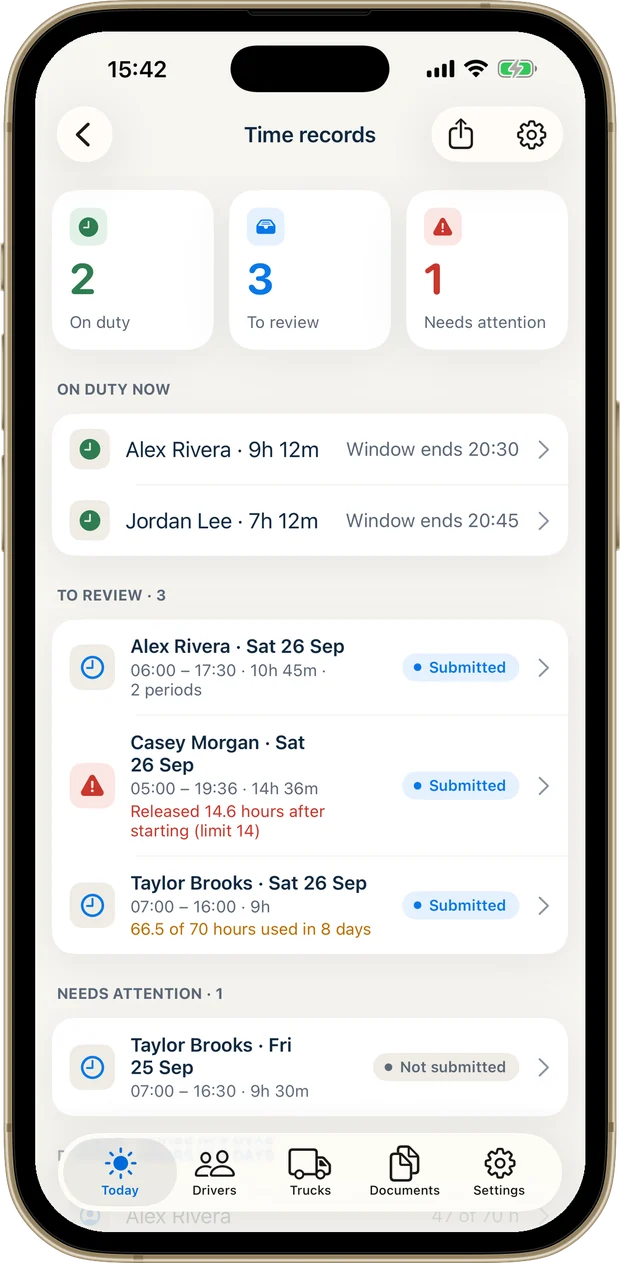
Your drivers’ hours, all together.
For local drivers who use the 150 air-mile short-haul exception (49 CFR 395.1(e)), often called the short-haul exemption, instead of logs.
- Drivers tap Start duty and End duty in the app or a web browser; split shifts add up automatically, even without signal
- Warnings at 13 hours, for short rest, near the 60/70-hour limit and for days that need a log
- The owner or an admin reviews each day; export PDF or CSV time records for any date range
Short-haul time records are not an ELD and do not replace one where an ELD is required.
The DOT compliance records Fleet Files keeps
Driver, vehicle, hours, and drug and alcohol records, each item with the rule it comes from. The app tells you what is missing.
Driver compliance
A qualification file for every driver, with the license and medical certification kept current.
49 CFR Part 391Vehicle compliance
Inspections at both ends of the trip, defects repaired, annual inspections and maintenance records.
49 CFR Part 396Hours
Time records for local drivers who run under the short-haul exception instead of logs.
49 CFR Part 395Drug and alcohol
Testing and Clearinghouse records, visible only to the owner and admins.
49 CFR Part 382Violations can stop your fleet.
placed out of service during one three-day inspection event.
Source: CVSA International Roadcheck 2026 · North America
Your team doesn’t need to download anything.
Invite admins and drivers by email; each person connects with their own private code. Browser access is included, so a driver with an Android phone can still do an inspection, record their hours or send in a document.
Invited by your company? Sign in with your code.
Ready when records are requested.
Create a PDF records packet with driver, truck and company records and a list of what is missing. Records sync securely across iPhone, iPad and web browsers.
Sized for your fleet.
Two plans, each one subscription for the whole company. Drivers and admins you invite are covered by it.
Starter
For owner-operators and fleets of up to 7 trucks
- Up to 7 trucks
- 11 driver logins
- Owner + 1 admin
- 10 GB of document storage
Fleet
For fleets of up to 30 trucks
- Up to 30 trucks
- 40 driver logins
- Owner + 4 admins
- 50 GB of document storage
Plans are monthly subscriptions, bought in the app and charged to your Apple Account. They renew unless canceled at least 24 hours before the end of the current period; manage or cancel in your App Store account settings. Add-ons are available while your subscription is active.
Questions
Is Fleet Files a DVIR app?
Yes. Drivers complete pre-trip and post-trip inspections on their phone with a checklist, defect photos, notes and a signature. The office sees every open defect until it is marked repaired, with who fixed it and when.
Does it work for an owner-operator with one truck?
Yes. The Starter plan covers one to seven trucks, so a single-truck owner-operator keeps the same driver file, truck records and reminders as a larger fleet.
What goes in a driver qualification file?
Fleet Files lists the records for each driver, such as the employment application, motor vehicle records, road test certificate, license and medical certification, and shows which are on file, missing or coming due. Each one names the rule it comes from in 49 CFR Part 391.
Is there an Android app?
No. The app is for iPhone and iPad, and the owner’s account is set up there. The admins and drivers you invite can use Fleet Files in a web browser on any phone or computer, Android included.
Is Fleet Files an ELD?
No. It keeps short-haul time records for drivers who use the 150 air-mile exception. It does not connect to the engine and does not replace an ELD where one is required.
Does it make my fleet compliant?
No app can promise that. Fleet Files is a record-keeping tool: it shows which records are on file, missing or coming due, and names the rule each one comes from. It doesn’t provide legal advice, certify compliance or predict the outcome of an audit or inspection.
Who can see drug and alcohol records?
Only the owner and the admins you invite. Drivers never see them.
Is there a free version?
No. Fleet Files needs a monthly subscription after setup. You can cancel at any time in your App Store account settings.
What happens to my records if I cancel?
You can export your records at any time. After paid access ends, your company’s records are kept for 90 days and then deleted, as set out in the terms.
How do I get help?
Email support@ledgerroad.com. A person answers.
Take a look at Fleet Files.
Your fleet’s paperwork, ready when you need it.
For iPhone and iPad. Subscription required.