 Fleet Files
 / Short-haul time records
Time records for short-haul drivers.
Local drivers under the 150 air-mile exception tap Start duty and End duty on their phone. You review each day and export the records when someone asks for them.

For iPhone and iPad. Drivers can also use any web browser, Android included.
- Start, end and total hours for every day
- Split shifts add up on their own
- Saves with no signal
How a driver records the day
Tap Start duty
In the app or in a web browser, when the driver reports for work.
Tap End duty
When they are released. A split shift is a second start and end; the hours add up.
Submit the day
The driver sends the day to the office once it is finished.
No signal?
The taps are kept on the phone and sent when it is back online.
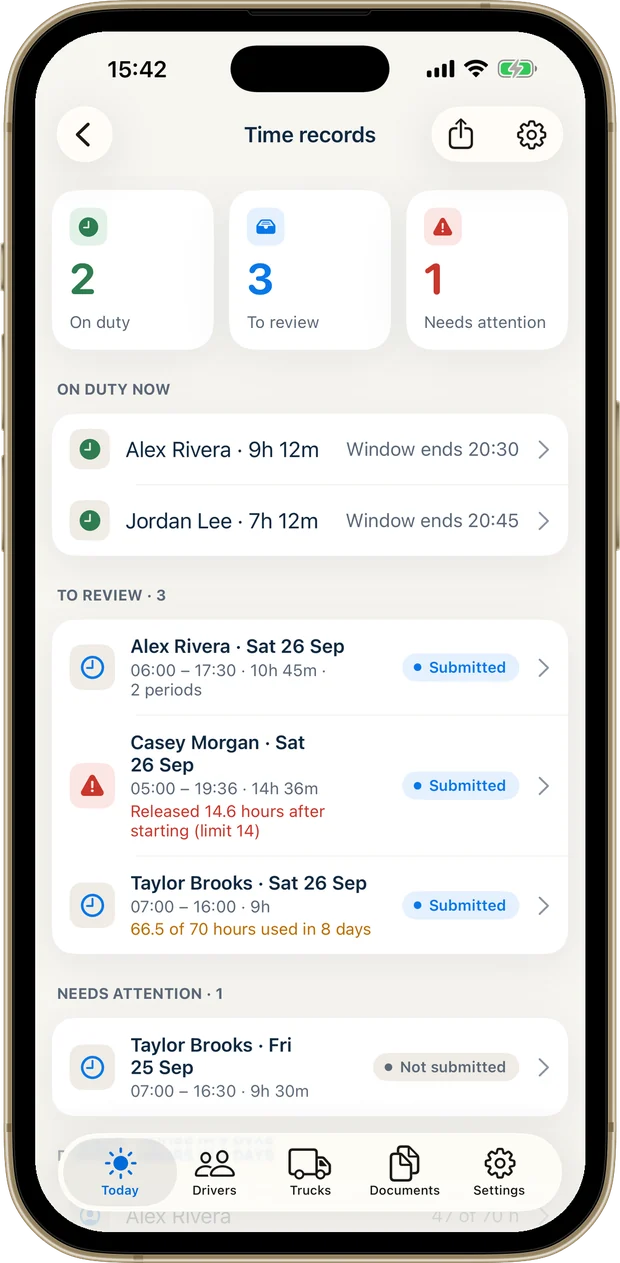
Every day reviewed, every change kept.
You see who is on duty now and which days are waiting for you.
- Review each submitted day, correct it or send it back to the driver
- Every change keeps its history: what it was, what it became and who changed it
- Warnings at 13 hours, for short rest, near the 60/70-hour limit and for days that need a log
- Export PDF or CSV time records for one driver or the fleet, for any date range
Short-haul time records are not an ELD and do not replace one where an ELD is required.
What each record shows
A carrier that uses the short-haul exception keeps time records for six months (49 CFR 395.1(e)). Fleet Files keeps the three things those records have to show for each day:
- The time the driver reported for duty
- The total hours the driver was on duty
- The time the driver was released from duty
Paper time sheet or Fleet Files
| Paper time sheet | Fleet Files | |
|---|---|---|
| Recording the day | Written at the end of the shift, or later | Two taps, stamped when they were made |
| Split shifts | Added up by hand | Added up for you |
| A long day | Noticed afterwards | A warning at 13 hours |
| Fixing a mistake | Crossed out and rewritten | Corrected with a note, and the old entry kept |
| Handing them over | Find the sheets and copy them | Export a PDF or CSV for the dates asked for |
| No signal | Works | Saves on the phone and syncs later |
Not sure a driver qualifies? Ledger Road has a guide to the 150 air-mile short-haul exemption.
Before you switch
Is Fleet Files an ELD?
No. It keeps short-haul time records for drivers who use the 150 air-mile exception. It does not connect to the engine and does not replace an ELD where one is required.
Which drivers is this for?
Local drivers who use the 150 air-mile short-haul exception in 49 CFR 395.1(e) instead of logs. Whether a driver qualifies is for the carrier to decide.
Can drivers use an Android phone?
Yes. Invited drivers record their time in a web browser on any phone, with their own private code. The app itself is for iPhone and iPad.
What happens on a day that goes past the limits?
Fleet Files warns the driver at 13 hours and marks the days that need a log, so you know which ones to follow up. It does not create that log.
Do I pay for each driver?
No. The drivers you invite are covered by your subscription, up to the number of driver logins in your plan.
How long are time records kept?
For as long as your company subscribes, which covers the six months the rule asks for (49 CFR 395.1(e)).
Citations follow Ledger Road’s guide to the short-haul exemption under 49 CFR 395.1(e).
Take a look at Fleet Files.
Your fleet’s paperwork, ready when you need it.
For iPhone and iPad. Subscription required.