 Fleet Files
Fleet Files / Driver qualification file app
Driver qualification files, kept on your phone.
Electronic driver qualification files for small fleets and owner-operators. See what is on file, what is missing and what is coming due for every driver, and scan the paper in with your camera.

For iPhone and iPad. Subscription required.
How a document gets into a driver’s file
Scan or import
Photograph a document or import a file. Dates are read from the page and suggested for you to confirm.
File it with the driver
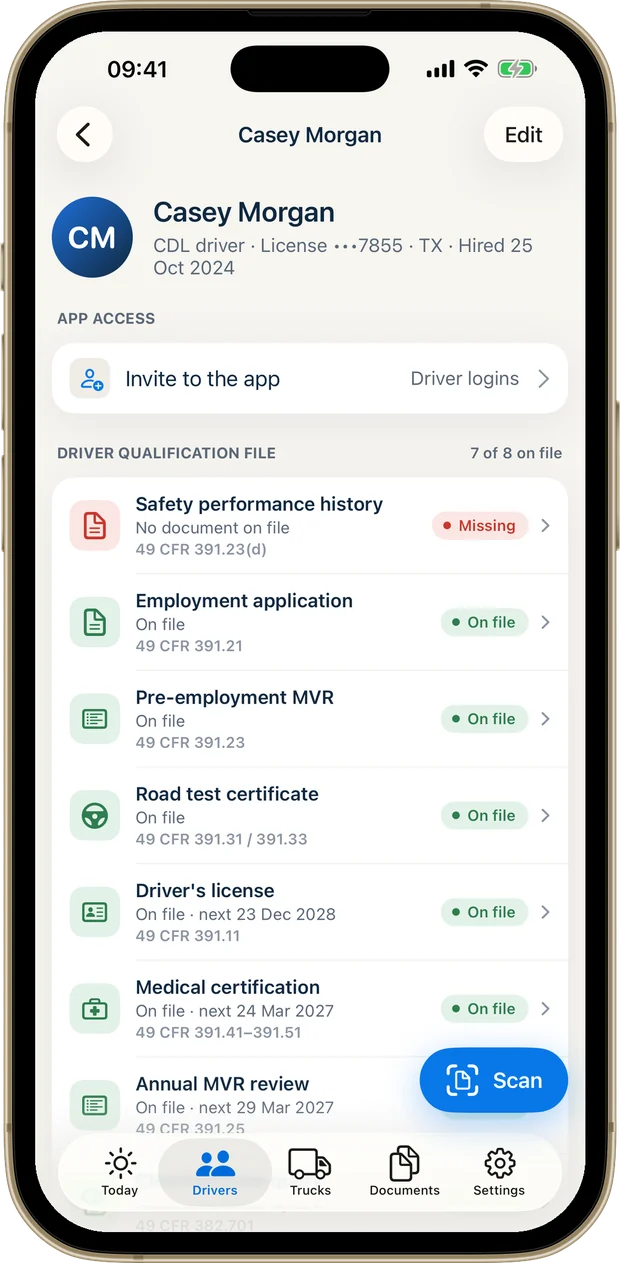
Choose the record type and the driver. The file shows it as on file, with its next date where there is one.
Get told before it lapses
Reminders before a license or medical card expires, as far ahead as you choose, and a list of what is missing.
Records in a driver’s file
Each driver’s file lists its records, shows whether each one is on file, missing or coming due, and names the rule it comes from. Among the records in a driver’s file:
| Record | Rule |
|---|---|
| Employment application | 49 CFR 391.21 |
| Pre-employment motor vehicle record (MVR) | 49 CFR 391.23 |
| Safety performance history | 49 CFR 391.23(d) |
| Road test certificate | 49 CFR 391.31 / 391.33 |
| Driver’s license | 49 CFR 391.11 |
| Medical certification | 49 CFR 391.41–391.51 |
| Annual MVR review | 49 CFR 391.25 |
Fleet Files is a record-keeping tool. It doesn’t provide legal advice or certify that a file is complete; always check the regulations that apply to your operation. For a printable list, Ledger Road has a free driver qualification file checklist.
Driver qualification management in the app
Scan with your camera
Paper goes in from the phone in your hand. The scan is read on the device.
Expiration reminders
Licenses, medical cards and hazmat endorsements, flagged before they lapse.
Drug and alcohol records are private
Drug and alcohol records, including Clearinghouse queries, are visible only to the owner and admins.
Drivers can send documents in
A driver uploads from the app or a browser; it counts once the owner or an admin approves it.
A packet when you’re asked
Create a PDF records packet with driver, truck and company records and a list of what is missing.
Every item cites its rule
Each record names the section it comes from, so you know why it is on the list.
Before you download
Can driver qualification files be kept electronically?
Yes. 49 CFR 390.32 allows records to be kept electronically, provided they can be accurately reproduced for anyone entitled to see them. Fleet Files keeps each document with its driver and builds a records packet when you are asked.
Does an owner-operator need a driver qualification file?
Yes. An owner-operator running under their own authority is both the carrier and the driver, and keeps a file on themselves (49 CFR 391.51(a)). Fleet Files treats the owner like any other driver.
Do non-CDL drivers need a DQ file?
If they drive a commercial motor vehicle for you, yes. The file is required for each driver, and a driver is anyone who operates a commercial motor vehicle (49 CFR 390.5 and 391.51(a)); holding a CDL is not the test.
Can I scan paper documents into a DQ file?
Yes. Scan with your camera or import a file. Dates are read from the page and suggested, and you confirm them before saving.
Who can see drug and alcohol records?
Only the owner and the admins you invite. Drivers never see them.
Can drivers upload their own documents?
Yes, from the app or a web browser. A driver’s upload counts once the owner or an admin approves it.
Does Fleet Files tell me my driver files are complete?
It shows what is on file against the list for each driver and what is missing. It does not certify compliance or replace checking the rules that apply to you.
Take a look at Fleet Files.
Your fleet’s paperwork, ready when you need it.
For iPhone and iPad. Subscription required.